
When parents look for a technology course, the first question is usually: “what is the best course?”. The more accurate question would be: “What is the best next step for my child right now?” In technology education, the right choice depends on age, maturity, repertoire, interest and family objective.
A 5-year-old child does not learn technology in the same way as a 14-year-old teenager. A student who is just starting out needs concrete, playful and accessible experiences. An older student can advance to textual programming, electronics, automation, AI, applications, and more complex projects. The secret is to respect the progression.
The My Robot technological track was designed so that the student advances without skipping steps. Technology first appears as a concrete experience and then gains technical depth. Thus, the child does not just “take classes”. She builds a trajectory.
Why not start with the more advanced course
Many parents are tempted to choose the course that seems most modern: artificial intelligence, Python, Arduino, apps or automation. These themes are relevant, but require foundation. Without logical reasoning, attention, autonomy and understanding of sequence, the student may become frustrated or simply repeat commands without understanding.
Starting with the appropriate course does not mean limiting the child's potential. It means preparing the way. A good track creates confidence, repertoire and maturity so that the student can reach advanced topics with more confidence.
First steps: playfulness, construction and concrete logic
For younger children, the most important thing is to develop curiosity, motor coordination, spatial awareness, cause and effect and first concepts of logic. Courses like FirstBot work on this beginning with large pieces, playful projects and intuitive programming using cards, respecting childhood and attention span.
At this stage, the objective is not to transform the child into a programmer. It's helping her think in steps, organize materials, test possibilities and realize that she can build something. The gain appears in confidence, concentration and the willingness to investigate.
School-age children: block programming and multidisciplinary projects
Between 7 and 11 years old, the child can already deal with more elaborate challenges. OneBot expands contact with robotics through practical projects, block programming and themes that connect science, technology, nature, energy, transport, the human body and cities.
This phase is important because the child learns to relate technology to the real world. A project is not just a montage: it explains a phenomenon, represents a situation or solves a challenge. The student begins to realize that robotics talks to Mathematics, Science, History, Geography, Art and communication.
Intermediate challenges: autonomy, problem solving and creativity
From the age of 9, many students are ready for challenges that require more planning. SkillBot deepens educational robotics with problem-solving, more precise fittings and structured block programming. The child is encouraged to analyze, test and create solutions with more autonomy.
Also at this stage, GameBot can be a very interesting gateway for students attracted to games. By using visual programming, sensors, LEDs and physical controls, the student understands that games are not just entertainment. They are systems with rules, events, logic and interaction.
From 12 years old: precision, electronics, programming and automation
When the student matures, the path can advance to more technical projects. TechBot works robotics with more precise mechanical construction, metal parts, controllers and programming. The student begins to deal with planning, adjustments, testing and systems analysis.
AutoBot, in turn, deepens the use of Arduino, sensors, actuators, programming, electronics and automation. It is a step recommended for students who can already deal with greater concentration, organization and technical responsibility.
At this moment, the technology is closer to real applications. The student understands how physical components and digital commands connect to create intelligent systems.
AI, Python, applications and professional courses
For teenagers, the path can go to textual programming, artificial intelligence, web systems and applications. The My Robot Artificial Intelligence course, for example, is aimed at students aged 13 and over and covers the fundamentals of generative AI, Python basics, APIs, chatbots, agents, memory, interfaces and deployment.
Courses such as App Developer, suitable for older students, bring students closer to creating applications and digital solutions. At this stage, the student does not just learn tools. It develops design, critical thinking, autonomy and application vision.
Caution here is essential: AI and advanced programming must be taught responsibly. The student needs to understand limits, ethics, data, privacy and quality of responses, not just use ready-made tools.
3D Print Lab, Electrobot and trails by interest
In addition to progression by age, there is also a choice by interest. A creative and visual learner may be enchanted by 3D modeling and printing. 3D Print Lab develops spatial reasoning, design, prototyping and materialization of ideas.
A student curious about circuits, energy, and how devices work might identify with Electrobot, electronics, automation, and sensors. These courses help students understand the physical world of technology.
The choice must consider the maturity, security and orientation of the unit. The ideal is to talk to the school, understand prerequisites and assess whether the time is appropriate.
How the trial class helps with the decision
The trial class is an important tool because it shows how the student reacts to the environment. Some parents only assess whether the child “liked it”, but that is not enough. Observe whether she participated, asked questions, tried to solve challenges, handled mistakes well, and showed curiosity after class.
The school must also offer pedagogical reading. Which course makes the most sense now? Does the student need to start at the base or can they move forward? Was he more interested in assembly, programming, games, electronics, design or AI?
This conversation avoids impulse choices and increases the chance of continuity.
What parents should ask before enrolling
Ask what the course progression is, what skills are worked on, how projects evolve, what materials are used and how the instructor monitors difficulties. Also ask how the school communicates progress to those responsible.
Another important point is understanding the family’s expectations. Is the goal to reduce passive screen? Develop logic? Stimulate creativity? Prepare for more advanced courses? Improve autonomy? The answer helps you choose the best entry point.
The best path is the one that maintains continuous development
There is no single path for everyone. There are children who start with playful robotics and then migrate to games. There are teenagers who are interested in Arduino and automation. Others prefer AI, apps or 3D modeling. The role of the trail is to offer continuity without forcing a rigid route.
Good technology education respects today's children while preparing tomorrow's young people. It does not accelerate artificially. It builds repertoire, confidence and ability to learn.
In the end, choosing the right track is not about choosing the “most advanced” or “most famous” course. It’s about choosing the right next challenge. When this challenge combines age, interest, methodology and monitoring, technology stops taking up time and starts building the future.
Next learning paths
If this topic made sense for your family, these tracks help turn curiosity into practical projects.

Firstbot
For ages 5 to 7, with playful, concrete and guided first steps in robotics.
View course
APP Developer
App creation, interfaces, Python logic and digital solutions from idea to delivery.
View course
Artificial Intelligence
Generative AI, data, APIs, chatbots and agents to create solutions with critical thinking.
View courseProducts to keep exploring at home
These Maker Store options match the article topic and help turn curiosity into hands-on projects.
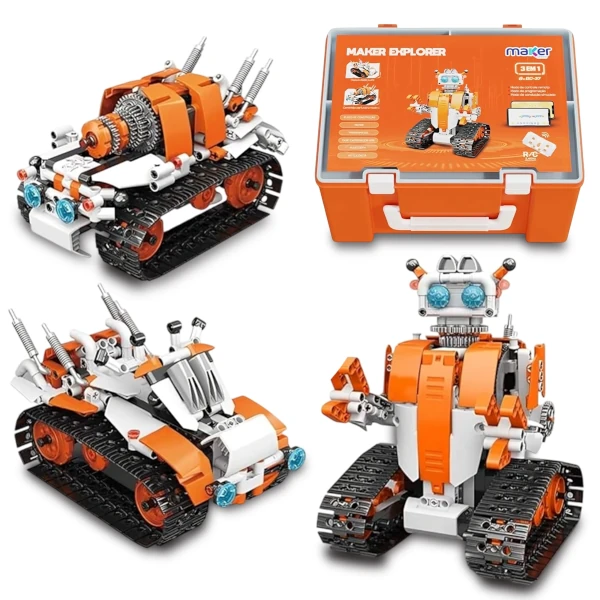
Maker Explorer 3-in-1 Robotics Kit
A practical entry point for building, observing movement and turning curiosity into creation.
View in Maker Store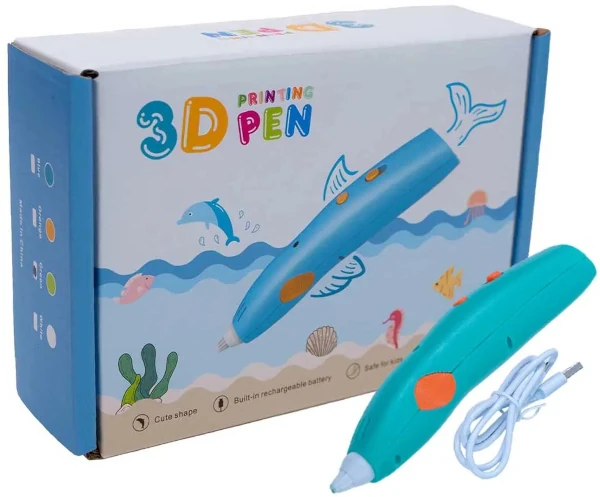
3D Printing Pen with filament and molds
Helps turn ideas into objects while encouraging creativity, coordination and prototyping.
View in Maker Store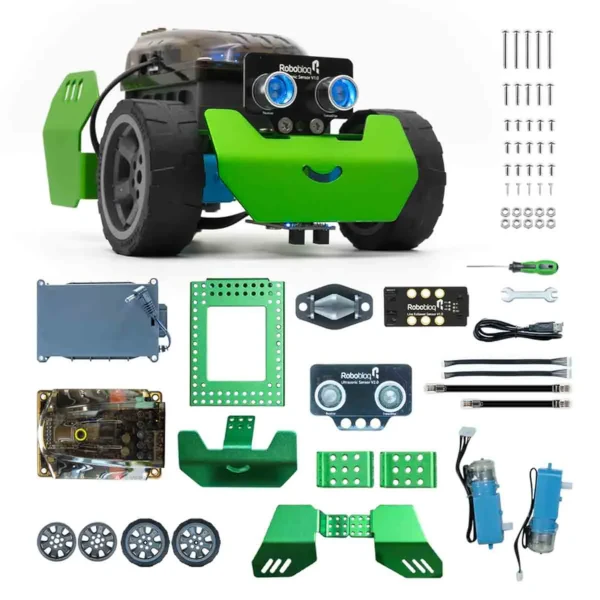
Maker Store Arduino Kit
Useful for exploring sensors, automation and first physical computing projects.
View in Maker StoreAffiliate links: when you buy through these links, you support My Robot Barra da Tijuca.
Want to see technology in practice?
At My Robot Barra da Tijuca, children and teens learn technology by creating projects, testing ideas and developing autonomy.