

Introduction
After taking care of SEO, sitemap, robots.txt, course pages, FAQ and structured content, I started looking at a new front: how to make the site easier to read by artificial intelligence tools.
That's where the file came in llms.txt.
The idea is simple: if search engines use sitemap.xml e robots.txt To better understand a website, it makes sense to also provide a clear, organized, and straightforward archive for language models, AI assistants, and tools that need to interpret a page's content.
But I didn't want to just publish the file and hope someone accesses it. I wanted to measure.
That's why I configured Google Analytics 4 to know if the llms.txt was being consulted.
What is llms.txt?
O llms.txt is a standardization proposal to place, at the root of a website, a Markdown file with information designed to help language models better understand that website when they need to answer questions or search for context.
In practice, it works as an organized summary of the website.
Instead of an AI having to navigate through multiple pages, menus, scripts, banners, and HTML structures, the llms.txt offers a cleaner path: it explains what the site is, what the most important pages are and where to find relevant information.
This is important because language models have a practical limitation: they can't put an entire website, with all its details, into the context of a response.
The llms.txt project website itself explains that complex HTML, navigation, advertisements, and JavaScript can make it difficult to extract useful content for LLMs.
Why does this matter to My Robot?
In the case of My Robot Barra da Tijuca, the website is not just a business card.
In other words: there is a lot of important context there.
When a person asks an AI something like:
“where is there a robotics course for children at Barra da Tijuca?”
or
“which school teaches programming and artificial intelligence to teenagers in Rio de Janeiro?”
I want the content of My Robot to be as clear as possible to be understood correctly.
O llms.txt It is not a guarantee of ranking, nor does it replace SEO, Google Business Profile, well-written content or advertisements. It is a complementary layer of organization.
Its function is to help AI better understand the website.
llms.txt does not replace sitemap or robots.txt
This point is important.
O sitemap.xml helps search engines find indexable pages.
O robots.txt indicates access rules for robots.
Already the llms.txt offers a curated view of content for language models. The project itself explains that it was designed to coexist with current web standards, complementing sitemap and robots.txt, not replacing these files.
So, in practice, I see it like this:
robots.txt   = orienta acesso de robôs
sitemap.xml  = lista páginas importantes
llms.txt     = explica o site de forma clara para IA
Each one has a different function.
What should the structure of an llms.txt be like?
The recommended format is Markdown.
The file should preferably be located in the root of the site, in /llms.txt, and must have at least one main title with the name of the project or website. It may also have a summary, additional explanations, and lists of links organized by sections.
A simple example would be:
# My Robot Barra da Tijuca

> Escola de robótica, programação e tecnologia educacional para crianças e adolescentes na Barra da Tijuca, Rio de Janeiro.

## Páginas principais
- [Cursos](https://www.exemplo.com/cursos.html): cursos de robótica, programação, IA e tecnologia.
- [FAQ](https://www.exemplo.com/faq.html): principais dúvidas de famílias e responsáveis.
- [Contato](https://www.exemplo.com/contato.html): endereço, WhatsApp e canais de atendimento.
The ideal is to use objective language, well-described links and avoid ambiguous terms.
The project itself recommends clear language, informative descriptions in links and testing with language models to see if they can respond well to the site's content.
The problem: Google Analytics doesn't measure llms.txt automatically
After I published the file, a practical question came up:
“How do I know if someone is accessing the
llms.txt?”
The first attempt was to look at GA4 in real time. But there is a technical detail: a file .txt is not a HTML page.
It does not load the Google Analytics script.
He doesn't have <head>.
It does not run JavaScript.
So if I simply publish the file as plain text, GA4 probably won't measure access automatically.
That's why I needed to create a server-side measurement.
The solution: send an event to GA4 via Measurement Protocol
To resolve this, I used Google Analytics 4's Measurement Protocol.
The Measurement Protocol is a way of sending events directly to Google Analytics servers, via HTTP requests.
Google's own documentation explains that it allows you to send data to Analytics differently than gtag, Google Tag Manager or Firebase, requiring events to be scheduled manually.
In my case, the logic looked like this:
1. Alguém acessa /llms.txt
2. O servidor entrega o arquivo normalmente
3. Ao mesmo tempo, o servidor envia um evento para o GA4
4. O evento aparece no Analytics como llms_txt_access
The event I created was:
llms_txt_accessWith this, I can know if the URL is being consulted without depending on JavaScript in the browser.
How I set up measurement in GA4
The process had two parts: one in Google Analytics and another in the website code.
1. I got Measurement ID
In GA4, I went to:
Administrador > Coleta e modificação de dados > Fluxos de dadosThen I selected the website's web flow and copied the metrics ID, which has this format:
G-XXXXXXXXXXThis value was saved as an environment variable:
GA4_MEASUREMENT_ID2. I created the Measurement Protocol Secret API
Still in the web flow, I accessed:
Chaves secretas da API Measurement ProtocolThen I clicked on create a new key.
This key was saved as:
GA4_API_SECRETThere is an important precaution here: this key must not be exposed in the public HTML, in the public JavaScript or in the GitHub repository.
How the event is sent
The server-side implementation sends a POST to the GA4 Measurement Protocol endpoint.
The payload used follows this idea:
{
  "client_id": "id_anonimo_gerado_no_servidor",
  "events": [
    {
      "name": "llms_txt_access",
      "params": {
        "file_path": "/llms.txt",
        "file_url": "https://www.myrobotbarra.com.br/llms.txt",
        "content_type": "text/plain",
        "source_type": "server",
        "page_location": "https://www.myrobotbarra.com.br/llms.txt",
        "engagement_time_msec": 100,
        "session_id": 1234567890
      }
    }
  ]
}
I also included session_id e engagement_time_msec, because these parameters help the event appear correctly in reports such as Real Time.
What not to send to Google Analytics
This point is fundamental.
I do not send name, telephone, email, IP, WhatsApp, student data, address or any personal data at this event.
The goal is just to know that the file was accessed.
So the event only measures something technical:
Alguém ou algum robô acessou /llms.txtIt doesn't measure who the person was.
Does not identify the visitor.
It doesn't turn this into a lead.
How did I validate that it worked
After implementation, I did the simplest test:
1. Acessei /llms.txt no navegador.
2. Voltei ao Google Analytics.
3. Entrei em Relatórios > Tempo real.
4. Verifiquei se /llms.txt apareceu na tabela de páginas.
And it worked.
GA4 now shows real-time file access.
After that, you can also consult:
Relatórios > Engajamento > EventosAnd search for the event:
llms_txt_accessShould this event be conversion?
In my view, no.
Access to llms.txt it's not a lead.
It's not click on WhatsApp.
It is not a completed form.
It is not a trial class schedule.
It is a technical event.
It is used to understand whether tools, bots, crawlers or users are consulting the file. Therefore, I do not recommend marking llms_txt_access as conversion in Google Ads.
Key events should represent confirmed business outcomes:
conversa_whatsapp_iniciada
formulario_enviado
aula_marcada
Page views, phone clicks, page openings, and other navigation events remain useful for analysis, but they are not key events. The legacy names clique_whatsapp, generate_lead, and ContatoWhatsApp are restricted to debug mode to prevent duplicate counting.
What I learned from this
The main learning is that technical SEO and artificial intelligence are getting closer and closer.
Before, the concern was just:
O Google consegue encontrar minhas páginas?Now the question also begins to be:
As ferramentas de IA conseguem entender corretamente o meu site?O llms.txt enters precisely at this point.
It doesn't solve everything, it doesn't replace good content and it doesn't guarantee automatic visibility. But it helps organize website information more clearly for language models.
And measuring this access in GA4 helps remove the doubt from the realm of supposition.
Instead of just publishing the file and waiting, I can now track whether it is being queried.
Conclusion
Create a llms.txt It is a simple but strategic initiative.
For an educational website like My Robot Barra da Tijuca, it helps to better explain the proposal, courses, methodology, main pages and the most important paths for those looking for information about robotics, programming and educational technology.
But publishing the file is only half the work.
The other half is measuring.
By configuring a server-side event in Google Analytics 4, I was able to know if the file is being accessed and validate that the URL appears correctly in real-time reports.
In practice, this is the type of technical adjustment that does not appear to the average visitor, but improves the website's digital organization and better prepares the brand's presence for an environment where search, AI and structured content increasingly go hand in hand.
Next step
Now that the event is up and running, I would track it weekly:
Relatórios > Engajamento > Eventos > llms_txt_accessWhat does this have to do with learning programming?
Behind a configuration like this there is something bigger than “tinkering with a tool”: there is programming logic, documentation reading, data organization, integration between systems, care for privacy and the ability to transform a real need into a functional solution.
These are exactly the types of concepts that bring young people closer to the professional world of technology.
When a student understands how an event is sent to an analysis tool, how an API receives data or how a system needs to handle information securely, they begin to realize that programming is not just writing code: it is building bridges between problem, logic and result.
Next learning paths
If this topic made sense for your family, these tracks help turn curiosity into practical projects.

Autobot
Arduino, sensors and automation to understand how digital commands move real systems.
View courseProducts to understand programming beyond the screen
Although the article is technical, it talks about logic, events, data and integrations. These products help young people understand how code and electronics can turn into real solutions.
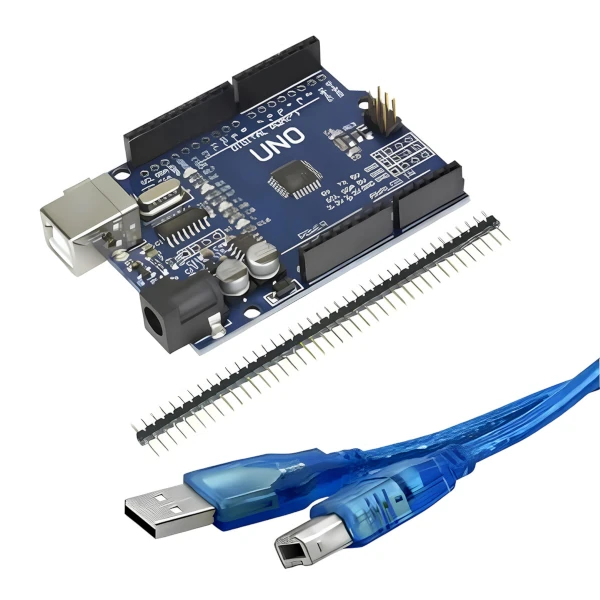
Board compatible with Arduino Uno R3
An affordable foundation for connecting programming, inputs, outputs, and physics experiments.
View on Maker Store
Arduino Kit Maker Store
Suitable for exploring logic, sensors, automation and first physical computing projects.
View on Maker Store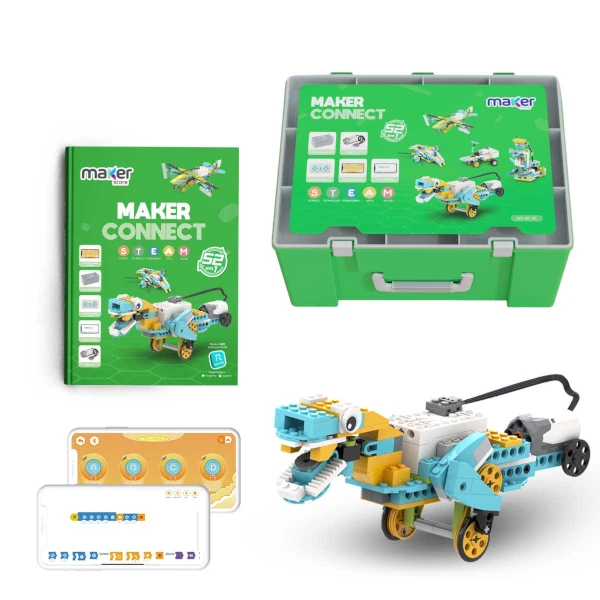
Maker Connect 52 in 1 Kit
Helps connect programming, assembly, and problem solving into practical robotics projects.
View on Maker StoreAffiliate links: by purchasing through these links, you support My Robot Barra da Tijuca.